Chrome extension that turns AI suggestions into standardized PowerShell scripts
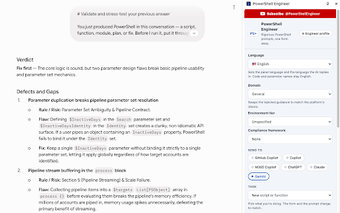
PowerShell Engineer, developed by Jim Tyler, is a Chrome extension that converts structured form inputs into high-context prompts to produce production-ready PowerShell scripts. It maps task-shaped forms to a strict prompt preamble, and focuses generated output on pipeline compatibility, error handling, and object-based results. Key elements include customizable PowerShell version and OS settings, live prompt preview, and model-agnostic enforcement. The extension targets IT professionals, DevOps engineers, and system administrators who need repeatable, auditable automation.
How the tool enforces a professional scripting standard
The extension builds an automated preamble that embeds a defined set of non-negotiables, often stored as AGENTS.md, so AI output adheres to professional practices. The Standard demands things like
- ShouldProcess support
- pipeline-compatible object output
- avoidance of Write-Host and invented parameters
How it keeps prompts local while supporting multiple AI platforms
The architecture uses a no-backend, zero-telemetry model and does not require an API key or account, so settings and prompt assemblies remain on the device. The extension standardizes prompt structure across major models, so ChatGPT, Claude, Gemini, Copilot, and others receive the same high-context instructions. Related ports exist for Firefox and Visual Studio Code, letting teams adopt the same approach in different developer environments.
Who benefits most and the expected workflow trade-offs
This tool fits IT professionals, system administrators, and DevOps engineers who need maintainable, inheritable automation rather than one-off snippets. It exposes task-shaped forms for creating scripts, scaffolding modules, refactoring, and diagnosing errors, which encourages repeatable outputs. The trade-off is operational: the extension assembles and standardizes prompts but relies on the user’s chosen AI chat interface for execution, so teams adapt their workflow to an external model endpoint.
A specialist extension for teams that require enforceable scripting standards
PowerShell Engineer is a specialist option for administrators and DevOps staff who must produce auditable, team-ready PowerShell code; the project’s privacy-first, no-telemetry approach supports corporate compliance. The extension asks teams to accept a workflow change, using their preferred AI chat for execution, but its emphasis on code quality and security makes it appropriate where consistent, inheritable automation is a priority.